
★★★★★
October 2, 2023
Fit and worked great

Replaces







About TRQ:
TRQ is a trusted brand dedicated to making every repair a success story by combining premium parts with easy installation. Each TRQ part is engineered by a team of automotive experts to meet or exceed OEM standards, delivering enhanced performance and maximum longevity. With rigorous in-house testing, the brand ensures superior fit and function across every product line. TRQ also provides customers with best-in-class, step-by-step installation videos—so you can complete repairs with confidence, whether you're a first-time DIYer or an industry professional.
Product Features
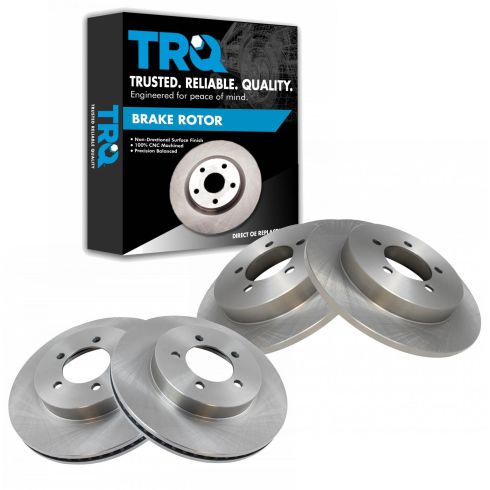
TRQ brake rotors are manufactured using premium G3000 casting alloy to reduce noise while braking and enhance service life. TRQ rotors have a non-directional finish to minimize the break-in period for new rotors and reduce vibrations throughout the rotor’s lifecycle. TRQ recommends replacing brake pads when you replace rotors to ensure even wear and improved component performance. All products are fit and road-tested in our Massachusetts R&D facility to ensure we deliver on our promise of Trusted Reliable Quality.
Attention California Customers:
 WARNING: This product can expose you to chemicals including Lead and Lead Compounds, which are known to the State of California to cause cancer, and birth defects or other reproductive harm. For more information, go to www.P65Warnings.ca.gov.
This part fits 6 vehicles spanning 2002-2005.
| Year | Make | Model | Description |
|---|---|---|---|
| 2002-2003 | Ford | Explorer | Ford Explorer XLT Front & Rear 4 Piece Brake Rotor Set TRQ BRA13688 |
| 2002-2003 | Ford | Explorer | Ford Explorer Limited Front & Rear 4 Piece Brake Rotor Set TRQ BRA13688 |
| 2002-2003 | Ford | Explorer | Ford Explorer XLS Front & Rear 4 Piece Brake Rotor Set TRQ BRA13688 |
| 2002-2003 | Ford | Explorer | Ford Explorer Eddie Bauer Front & Rear 4 Piece Brake Rotor Set TRQ BRA13688 |
| 2004-2005 | Ford | Explorer | Ford Explorer Front & Rear 4 Piece Brake Rotor Set TRQ BRA13688 |
| 2002-2005 | Mercury | Mountaineer | Mercury Mountaineer Front & Rear 4 Piece Brake Rotor Set TRQ BRA13688 |
| Brand Label | Part Number |
|---|---|
| Raybestos Brakes | 680026 |
| Aimco | 54098 |
| Wagner | BD125758 |
| Aimco | 54094 |
| DuraGo | BR54094 |
| Wagner | BD125759 |
| DuraGo | BR54098 |
| Raybestos Brakes | 680014 |
| Bendix | PRT5358 |
| Bendix | PRT5311 |
| DIY Solutions | BFS00705 |
| Raybestos Brakes | 680026FZN |
| Raybestos Brakes | 680014P |
| Raybestos Brakes | 680026P |
| Raybestos Brakes | 680026R |
| Raybestos Brakes | 680014R |
| Raybestos Brakes | 680014FZN |
| Raybestos Brakes | 680026PER |
| Hollander | 530-02121 |
| Hollander | 533-02490 |
| Hollander | 533-02421 |
This item may be interchangeable with parts from other brands with the above part numbers. This information is provided only for reference and does not guarantee that the item you are purchasing is identical to parts with part numbers from the brands listed above. To confirm that this item fits your vehicle, use the above "Check Vehicle Fit" option.
Lifetime Warranty
This item is backed by our limited lifetime warranty. In the event that this item should fail due to manufacturing defects during intended use, we will replace the part free of charge. This warranty covers the cost of the part only.
FREE Shipping is standard on orders shipped to the lower 48 States (Contiguous United States). Standard shipping charges apply to Hawaii and Alaska.
Shipping is not available to a P.O. Box, APO/FPO/DPO addresses, US Territories, or Canada for this item.
Expedited is available on checkout to the United States, excluding Alaska, Hawaii.
Final shipping costs are available at checkout.
Created on:
Tools used
Brought to you by 1AAuto.com, your source for quality replacement parts and the best service on the Internet.
Hi, I'm Mike from 1A Auto. I hope this how-to video helps you out, and next time you need parts for your vehicle, think of 1AAuto.com. Thanks.
In this video we're going to show you how to replace the front brakes on this 2003 Mercury Mountaineer. We show you on the passenger side, but the driver's side is a similar procedure. The items you'll need for this are new brake pads and rotor kit from 1AAuto.com; a 14, 18 and 19mm socket and ratchet with a piece of pipe for extra leverage; a flat blade screwdriver; a hammer; jack and jack stands; a torque wrench; a large C clamp; brake grease; and a wire brush.
Pry off the hubcap by using a flat blade screwdriver in the small slot on the side. Once you get it started, you can just pull out around the edges. We'll just fast forward as Mike removes those 19mm lug nuts. If you don't have air-powered tools, you want to loosen them while the vehicle is on the ground, raise the vehicle and remove them the rest of the way. Now you can pull the wheel free.
You want to just inspect your brakes. Just take your fingernail and go up and down. You're feeling for any grooves. Small grooves are okay, but anything that really gets your fingernail stuck in there or anything is a little too much. You want to either replace your rotors or turn them down. Do the same thing on the back side. You can see the inner pad here. That's got some pretty good life left on it. Then the outer pad, if you look right here, you see between the metal here and the rotor. There's good life on that. The brakes are actually in really good shape on this, but we're going to take them off and put them back on to show you how to do it.
Now just open up this clip with a flat blade screwdriver. You just have to pry the tab and pull it open. Just pry the harness out of this clip and pull it out of these three. Then you want to remove these two 14mm bolts. We'll just fast forward as Mike does that. Now, using a flat blade screwdriver, just pry right here and that will push the piston in on the caliper and make it easier to pull the caliper off. Do it again down here and pull the caliper free. You want to set it up and out of the way so we're just going to put it up here. Just to make sure it doesn't fall down, use a wire tie to just secure it up there. Now pry out your brake pads. The best way to tell the life left in your pads is this little slot right here is a wear mark, so you can see it pretty much goes away once you have about an eighth of an inch of pads left. Like I said before, these pads have quite a bit of life left on them.
Now remove these two 18mm bolts. You can see he's using a piece of pipe for some extra leverage. When you pull out the last bolt the caliper bracket pulls free. Pull your rotor off.
Take your rotor and push it into place and then replace a lug nut just to hold it there while you reassemble the caliper bracket and caliper. If your new brake pads do not come with any new slides, you'll want to wire brush off the slides. If they do, then you can just pull the old slides off and then clip the new slides into place. Make sure your caliper bolts slide in and out easily. You can see the top one does. This one does not, so we pull it out. You want to just pull this boot off and then clean up the slide. Take some brake grease and just apply it all over the bolt. Slide the boot back on and then slide it back into your caliper bracket. You may have to repeat that two or three times until it slides nicely. Each time you put it in and take it out it will take some more dirt out. Now, using mineral spirits or brake cleaner, just wipe down the rotor.
Now take your caliper bracket, line it up and then just replace those two 18mm bolts and tighten them up. Then torque both of those to 85 foot-pounds.
Next put a little grease on the ear here and here, and some grease here just to keep the squeaking down. These tabs really hold it in place, so you could just take your finger, bend them down a little bit. It helps get in there a little bit. Then take the pads and kind of go in diagonally, so they go up against those ears. Push in. The top went in but the bottom just needs a little more convincing. For the back one, put some grease on the ends and some grease on the outer face. Let's see, just kind of put it in diagonally. I use my hammer just to kind of tap it in. Now remove your wire tie and pull your caliper back down. Then take one of your old brake pads and then just use the large C-clamp to push in those pistons on the caliper. Then just remove the C-clamp and the brake pads when the caliper pistons are pushed all the way in. Then take your caliper and push it back into place over your brake pads. You want to make sure that those slides push down underneath and line up.
Once they're lined up, replace those two 14mm bolts and tighten them up. Then torque both of those to 25 foot-pounds. Then just push this back into those three clips and then back into this bracket and then close that final clip. Wipe down any dirt you may have gotten on your rotor while replacing the caliper and then remove that lug nut, replace your wheel, then replace all the lug nuts and tighten them preliminarily. Then you'd want to lower the vehicle and tighten them the rest of the way, then torque each of these in a crossing pattern to 100 foot-pounds. Now replace your hubcap. Just line it up and hit it back into place.
Whenever you've done any work on your brakes you want to just pump the brake pedal until it firms up. Then you want to do a stopping test from five miles per hour, then 10 miles per hour.
We hope this video helps you out. Brought to you by www.1AAuto.com, your source for quality replacement parts and the best service on the Internet. Please feel free to call us toll-free, 888-844-3393. We're the company that's here for you on the Internet and in person.
Tools used
Hi, I'm Mike from 1AAuto. We've been selling auto parts for over 30 years! We're dedicated to delivering quality auto parts, expert customer service, and fast and free shipping, all backed by our 100% satisfaction guarantee. We've created thousands of videos to help you install our parts with confidence. That saves you time and money, so visit us at 1AAuto.com, your trusted source for quality auto parts.
In this video, we're going to show you how to replace the rear brakes. This is a 2006 Ford Explorer and I hope you like this video.
If you do, click the subscribe button, and also check out our channel for lots of other videos for this Explorer, as well as a bunch of other vehicles. You can also buy the parts in this video by clicking the link down below and visit 1AAuto.com.
Here are the items you'll need for this repair: 10-19mm sockets, ratchet, breaker bar, large flat blade screwdriver, hammer, wire brush, paper towels, brake cleaner, brake grease, large c-clamp, torque wrench, jack, jack stands
With the vehicle on the ground, 19 millimeter socket or your tire iron and loosen up your lug nuts. Raise and support the vehicle. You can use a jack and jack stands. We are using a lift. Remove the lug nuts the rest of the way, and remove the wheel and tire.
Use a large screwdriver, insert it here, and pry out to push the piston back into caliper. This'll help you get it apart easier. There's two 10 millimeter bolts to remove: one down here and one up here. Use a wrench or socket and ratchet to remove those. Once those bolts are out, use your wrench or your screwdriver and pry the caliper out. Set these bolts aside and then the outer pad, you have to push it out and then pry up. I'm pushing this way and then prying up and the pad comes out and the inner pad just pulls right out. You can either secure your caliper with a bungee or just make sure that you don't stress the brake hose.
Remove the disc. It should just pull off. There’s a lot of corrosion, so we're expecting a little bit of a fight. I'll put a lug nut on just to make sure it doesn't fly too far. If you're going to reuse your disc, you don't want to hit it with a hammer. We're going to be replacing this one, so we're not that worried about it.
You've got your original brake shoes and new ones from 1A Auto—they're all the same. They’re going to install exactly the same. If you're inspecting your old ones, this little mark here is a wear mark, so if it's gone, as it is on these pads, you know you need to replace your pad. See the new ones, nice large wear mark, so you know that they're in good shape. Rotors here: the original one and new one from 1A Auto. It’s exactly the same, has the provision on the back for the emergency brake, and will install just like the original. We're going to just preliminarily install our rotor.
Okay, and then we want to adjust our brake shoes so that there's some tension between the brake shoes and the rotor. Right now, it's very loose. So the best way to adjust is just use something, push up on the spring a little bit, and then you can just adjust out. Make sure as you turn it that you're expanding the gap between here and the adjuster shoe. You can feel a little bit of tension between the shoe and the disc, then I'll just do it a little bit more.
Okay, good tension, not too much movement, and now it's a little difficult to pull off, so I know I have the tension right. Brake parts cleaner clean off the surface of the shoes. Then the same thing, brake parts cleaner, clean out the surface of the rotor and install the rotor. Clean the rotor surface and the backside.
Use a wire brush and clean your slides here. If your car does have a lot of rust, you may want to pull these off and chip away at the cast iron underneath. A lot of times, what happens on these vehicles is that they rust. These expand and may cause binding in the brake shoes. If they don't look clean or if they look bowed out at all, you'll want to take them apart and make sure there's no rust built up underneath.
Use some silicone brake grease and grease these slides on the top and bottom. You want to reset the piston into your caliper so put your old shoe back in. This gives you a better point to press on. Big c-clamp and push it all the way back in. And you want to make sure that your bolt slides are in good shape and free and as long as they are you can put them back together. If not, you can pull them right out, clean them up, and use some silicone brake grease and reassemble them. We put some grease on the back of our pads, put the inner one in first and now push it into place. And then the outer one slides down and on. I need to pull those out just a little bit.
Make sure your bolt slides are all the way out, they'll get hung up otherwise. Put the top into place and put it down on and put your bolts back in. Tighten the caliper bolts to 24 foot-pounds. Reinstall your wheel and tire. Put the vehicle back on the ground, you want to tighten your lug nuts to 100 foot-pounds using a star pattern. Any time you work on your brakes, before you go out and test drive just pump them a few times, make sure you have a nice firm pedal before testing.
Thanks for watching. Visit us at 1AAuto.com for quality auto parts, fast and free shipping, and the best customer service in the industry.
Fit and worked great

BRA13688
